


NZZ Nachrichten
4.098.00 Reviews
App Specs
- Version
- 14.3.0
- Updated On
- License
- Free
- Downloads
- 500,000+
- Developer
- Neue Zürcher Zeitung AG
- Categories
- News & Magazines
- Platform
- Android, iOS
Screenshots

 Analysis by AppCompare
I tend to judge a news app by a practical question: does it help me understand what is happening, or does it simply give me more headlines to scroll past? NZZ Nachrichten is aimed at readers who want reporting and analysis from Neue Zürcher Zeitung AG, rather than a feed built around quick snippets alone. It is free to install, but that does not mean every article is free to read, so I would decide based on how often I expect to use it and what kind of coverage I value.
Choose it for the kind of reading you actually do
Before making it my main news app, I would think about whether I enjoy spending time with longer articles. A phone feed is convenient for checking a headline while waiting for a train, but the real value of a publication-focused app is usually in the context behind the headline. If I want a steady source to return to for Swiss and international affairs, economics, politics, and culture, this is a more natural fit than an app whose main purpose is to gather short updates from many publishers.
That distinction matters in everyday use. When I have only a minute, I may prefer a general headline aggregator that puts stories from different outlets side by side. When I have time to follow an issue properly, a publication with its own editorial voice can be more satisfying: I can read a developed account instead of stitching together several fragments. Neither approach is automatically better. It depends on whether I am scanning broadly or trying to understand a particular subject.
Where its focused approach can pay off
The app is in the news and magazines category, and its appeal is tied to the work of its publisher. I would not treat it as a neutral window onto every viewpoint; I would treat it as a direct way to read NZZ journalism. That makes it useful for readers who already know they value that perspective, and for anyone who wants a consistent editorial source rather than a constantly changing mix of outlets.
In my experience, the most useful way to approach a publication app is to give it a specific job. I might use it for a considered morning read, then rely on a broader news service when I want to see how several organizations are covering the same breaking event. This keeps the app from becoming just another stream of alerts and makes its depth easier to appreciate.
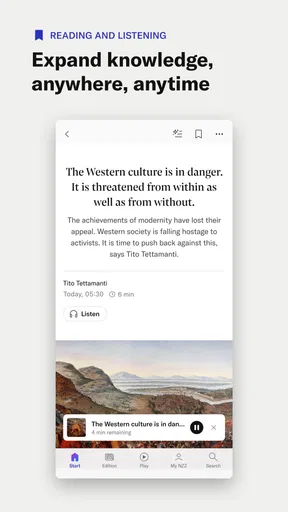
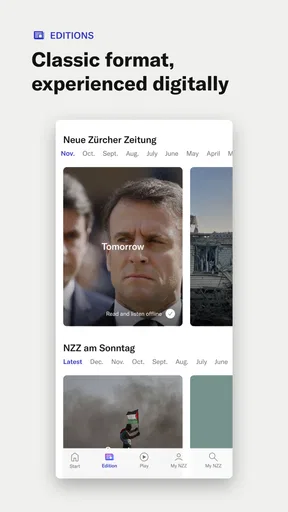
A realistic routine would be to check the main stories over breakfast, open one article that connects to a topic I follow, and save the longer read for a commute or quiet break. If I have a patchy connection, offline reading can make that routine more dependable. I would prepare articles while online rather than assume every story will be available at the moment I need it; that small habit turns the feature into a useful backup instead of an emergency workaround.
Personalization without losing the wider picture
The original article describes options for tailoring the feed to preferred topics. That can help when I want less time spent searching for the subjects I care about, but I would avoid narrowing the selection too aggressively. A feed built only around familiar interests can make the day’s news feel smaller than it is. I would choose a few priorities and still leave room to browse outside them, especially when a major story crosses into areas I do not usually follow.
Worth Reading Before You Choose

EA SPORTS FC Mobile 26 Is a Bigger Football Game, but It Takes Time

Flipboard Shows What News Apps Must Do Beyond the Feed

Switching to Android Auto Means Rethinking Your Driving Routine

Google Calendar Makes a Crowded Week Easier to Manage

Ludo King Makes the Most of the Minutes Between Plans

Baby Panda World Brings Quick Play to Modern Phones, but Its Game Library Feels Busy
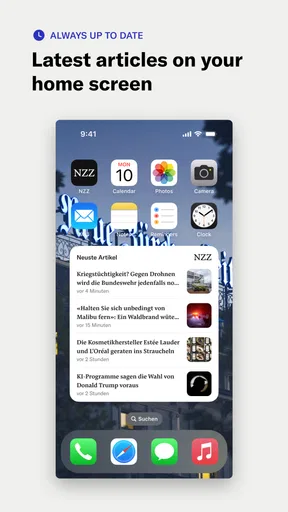
Notifications need the same kind of restraint. Breaking-news alerts are useful when a story genuinely changes quickly, but frequent prompts can interrupt work and make every update feel equally urgent. I would start with only the alerts I know I want, then adjust them after seeing how they fit into a normal day. If I prefer to read at chosen times, keeping notifications limited and opening the app deliberately may be a better arrangement.
How it compares with other ways to follow the news
Compared with a general news aggregator, this app offers a more focused relationship with one publisher. An aggregator is often the better choice when breadth and quick comparisons matter most; it can help me discover coverage from multiple sources in one place. The trade-off is that the experience may feel less coherent, and a collection of headlines does not always provide the same depth as reading a full article from a publication.
Compared with a newspaper’s mobile website, a dedicated app can make repeated reading feel more convenient, especially if I use its topic selection, notifications, or offline reading. A website may be preferable if I only visit occasionally or do not want another app on my phone. And if I mainly want fast bulletins, a broadcast-news app or a concise briefing service may suit me better than an outlet whose strongest case is sustained reporting.
I would also keep the app’s editorial perspective in mind. No single publication can serve as my only source for every subject, and a strong point of view is not a substitute for comparing coverage when a story is contentious. For important or developing issues, I would use NZZ as one considered source and check other reputable outlets for additional reporting and interpretation.
User-Friendly Interface
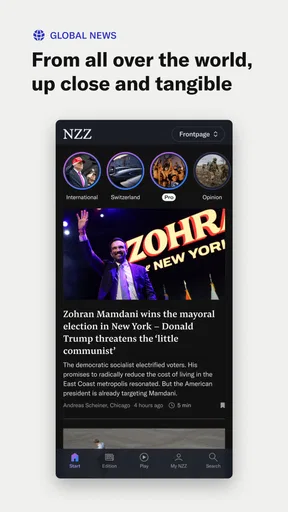
First off, the interface of the NZZ Nachrichten app is super intuitive. You know how some news apps can feel cluttered and overwhelming? This one is like a breath of fresh air. It’s got a clean layout with easy navigation, making it a breeze to find the stories that matter to me. The categories are neatly organized, which is great when you’re in a rush and just want to catch up on specific topics.
Comprehensive News Coverage
What truly stands out is the comprehensive coverage. Whether you're interested in politics, economics, technology, or culture, this app has it all. I was pleasantly surprised by the depth of the articles. They are not just snippets but detailed pieces that provide a well-rounded view of the topics. It’s like having a personal newspaper right in your pocket.
Personalized Experience
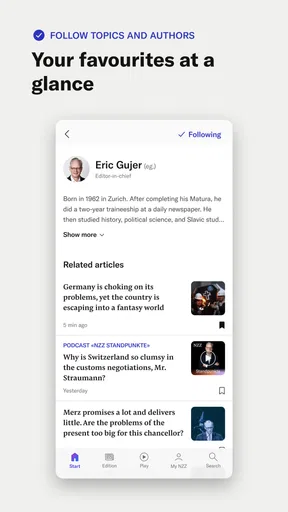
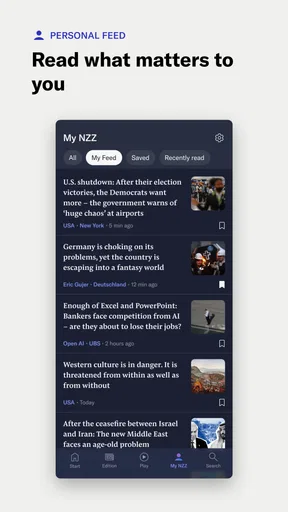
Another highlight is the ability to personalize the news feed. I love being able to tailor my experience based on my interests. The app allows you to select your favorite topics, ensuring that the news you care about is always front and center. It’s like having your own custom-made news station.
Offline Reading
Oh, and let’s not forget the offline reading feature. I often find myself in places with spotty internet, and being able to save articles for offline reading is a game-changer. This feature ensures that I can catch up on my reading anytime, anywhere, without having to worry about connectivity issues.
Push Notifications
The push notifications are another great feature. However, they can be a bit of a double-edged sword. On one hand, I love being instantly updated with breaking news. But on the other hand, they can sometimes be a bit too frequent. Thankfully, the app allows you to customize these notifications, so you can decide how much or how little you want to be pinged.
Visual Appeal
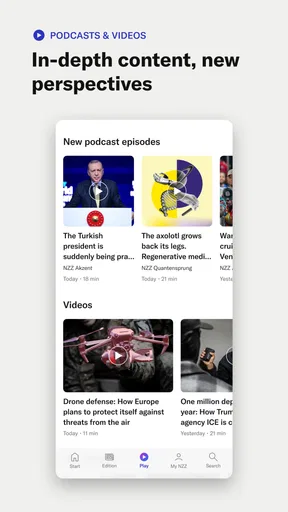
Visually, the app is quite appealing. The use of images and videos alongside articles enhances the reading experience. It’s not just about reading the news; it’s about experiencing it. The multimedia integration is seamless and adds another layer of engagement to the stories.
Subscription Model
Now, let’s talk about the subscription model. While the app is free to download, accessing premium content requires a subscription. This might be a deal-breaker for some, but considering the quality of content, it’s a worthwhile investment for avid news readers. The app does offer a few free articles daily, which is a nice touch for those who want a taste before committing.
Cost, compatibility, and switching
The app has a 4.0 average from around 15,000 ratings, and it has passed 500,000 installs. Those figures suggest an established audience, though they cannot tell me whether its editorial approach will suit my interests. It is rated for Everyone 10+, runs on devices with version 8.1 or later, and the current release is 14.3.0. I would check that my device meets the minimum before downloading, particularly if I keep an older phone in service.
Downloading is free, while in-app purchases range from $0.99 to $670.00 per item. That is a wide span, so I would inspect the purchase and subscription choices shown in the app before committing and make sure I understand what access each option provides. If I only want to sample its journalism, I would begin with the available free reading rather than assume that every article is included at no cost.
Switching from another news app does not require abandoning it. I would keep my existing source while trying this one for a week, compare how often I actually open it, and note whether its articles add context I was missing. If I already pay for another publication, the key question is not which app has the nicer layout; it is whether I will read enough from both to justify keeping both in my routine. A focused trial is a more sensible test than replacing every source on day one.
Who should choose it—and who may not
I would recommend it to readers who enjoy substantial articles, follow public affairs or business, and want a direct connection to NZZ’s reporting. It also makes sense for someone who likes a curated publication experience and is willing to manage alerts rather than leave every notification enabled. If reading is part of a commute or a regular quiet moment, the combination of topic selection and offline access can support a dependable habit.
I would hesitate if I mainly want a free, all-purpose headline feed, need a broad mix of publishers in one view, or rarely read beyond a few lines. In those cases, an aggregator, a broadcaster’s news app, or a publication with a different editorial focus may be more useful. The subscription element is another reason to be selective: a free download is easy to try, but ongoing access should match how often I genuinely read the journalism.
All in all, the NZZ Nachrichten app is a fantastic tool for anyone who values staying informed. Its combination of quality journalism, user-friendly interface, and customization options make it a top choice in the crowded space of news apps. Whether you’re a news junkie or just someone who likes to stay in the loop, this app is definitely worth a download. Give it a try, and you might just find it becoming your go-to news source!
Pros
- Clean and intuitive interface.
- Real-time news updates.
- Customizable news alerts.
- In-depth analysis available.
- Offline reading mode.
Cons
- Limited free content.
- Occasional ad pop-ups.
- Slow loading on older devices.
- No dark mode option.
- Subscription required for full access.
FAQs for NZZ Nachrichten
What features does the NZZ Nachrichten app offer?
The NZZ Nachrichten app provides users with comprehensive news coverage, including breaking news alerts, in-depth articles, and opinion pieces. It also features multimedia content like videos and podcasts, customizable notifications, and offline reading options. The app's clean interface ensures a seamless browsing experience, making it easier for users to stay informed.
Is the NZZ Nachrichten app free to use?
While the NZZ Nachrichten app can be downloaded for free, it offers both free and premium content. Some articles and features may be behind a paywall, requiring a subscription to access. Users can choose various subscription plans that cater to different needs, ensuring access to all premium content and features.
What languages does the NZZ Nachrichten app support?
The NZZ Nachrichten app primarily supports German, as it is designed for users who follow the Neue Zürcher Zeitung's coverage. However, some sections may offer translations or summaries in other languages, but the main focus remains on delivering content in high-quality German, catering to its target audience.
Can I customize the types of news I receive on the NZZ Nachrichten app?
Yes, the NZZ Nachrichten app allows users to personalize their news feed by selecting preferred topics and categories. This customization helps users receive updates on subjects they are most interested in, enhancing their reading experience. Additionally, users can set up notifications for specific topics to stay updated on the latest developments.
How can I manage notifications on the NZZ Nachrichten app?
To manage notifications on the NZZ Nachrichten app, users can access the settings menu within the app. Here, they can choose which types of notifications they wish to receive, such as breaking news, daily summaries, or updates on specific topics. This ensures users only receive alerts that are relevant to their interests, reducing unnecessary interruptions.


